Batch It Ultra
Batch It Ultra is our flag ship comprehensive Batch Image Processor. This current version 6 has been totally redesigned and rewritten from bottom up to support the latest Windows Operating System. It now comes in two editions which natively supports 64 Bit Windows.

Buy GUI Version ($19.95)
Buy Command Line Version ($65.95)
Buy Server Version ($299.95)
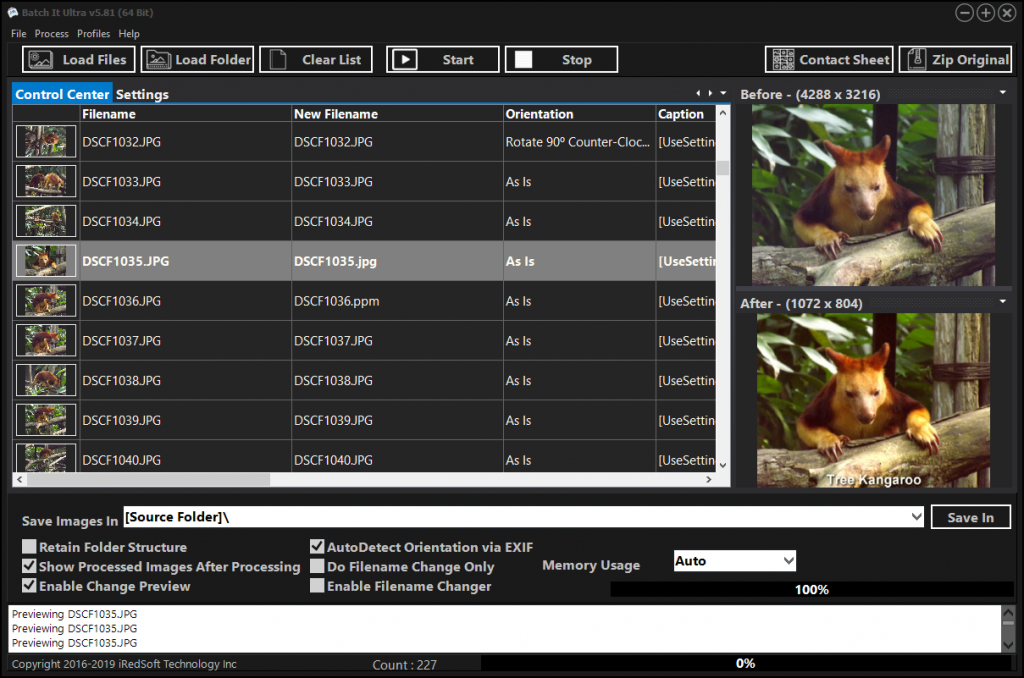
The Key Features of Batch It Ultra 6 includes
- Batch Resizing. It supports popular resizing methods which includes Downsizing By Pixels, Upsizing By Pixels, By Percentage, By Ratio, By Cropping and By Frame. You can resize the photos while retaining its original Ratio Aspect or perform a batch cropping to remove any undesirable borders especially when the documents are being scanned. In order to allow you to fine-tune the resultant photos, Batch It Ultra offers you the option to utilize different Resampling Algorithm to enhance the image quality. The Resizing By Frame method allows you to keep the same width and height dimensions while keeping the same ratio aspect for all your images by padding the smaller dimensions with the frame color. Resizing By Frame can either downsize or upsize the pictures to fit.
- In order to save you time, you can use Batch It Ultra to resize the same images into 3 different sizes in a single run. You can use this to make adjustment to your original file and save an additional two more sizes for perhaps for different screen displays or as thumbnail photos.

Resizing By Frame
- Batch Format Conversion. It supports importing of images of many commonly used formats such as JPEG, PNG, Adobe RAW (DNG), Canon RAW (CR2 & CR3), FujiFilm RAW (RAF), Nikon RAW (NEF), Mamiya RAW (MEF), Minolta RAW (MRW), Olympus RAW (ORF), Panasonic RAW (RW2), Pentax RAW (PEF), Samsung RAW (SRW), Sony RAW (ARW & SR2), TIFF (Single Page), BMP, JPEG 2000, PCX, Windows HD Photo, GIF, TARGA, DIB, RLE, PIX, Truevision Vista Graphic, Portable Bitmap, GFI Fax, Adobe Photoshop, Paint Shop Pro, Dr Halo Cut and Kodak PhotoCD. It supports export to JPEG, PNG, BMP, GIF, TIFF, JPEG 2000, PCX, PBM, PPM, PGM, TARGA and Windows HD Photo Formats.
- 48 Bit Color Depth Support for TIFF Images. Apart from the 1 Bit, 2 Bits, 4 Bits, 8 Bits and 24 Bits Color Depth for the supported images, we also support 48 Bit Color Depth for TIFF.

- Image Effects. Apart from resizing the images, Batch It Ultra has a comprehensive toolbox to enhance your photos. This includes Sharpen, Sharpen More, Blur, Blur More, Brightness, Contrast, Old Photo effect, Emboss, Negative, Grayscale, Auto Equalize, Red, Green, Blue, Drop Shadow, Red Eye Removal, Round Corners and Borders. It also offers the option to create a tiled image.


Rounded Corners Negative

Sepia

Tiling

Grayscale
- Batch Filename Changer. It supports batch renaming of all your image files to a name which would be more relevant to you. It allows you to add a prefix and/or suffix to the existing filename, Add a running number to the images and even change the way the new filename would appear based on your preferences. It comes with several macros such as file dates which can be used to generate the new filenames. You can utilize the Smart Replace method to change certain text within the original filename to something else. This will allow you to rename your image files to something more descriptive.Now this support is extended to all types of files so you can use it to rename your videos or document files.

- Batch Text Captioning. Text Captions can be copyright text, descriptions or captions which you can add to the images. Batch It Ultra offers 14 different location options to where you want to add the Text Captions on the image, this includes Diagonal, Top (Left, Middle, Right), Center (Left, Middle, Right), Bottom (Left, Middle, Right) and Vertical Left Bottom Up, Vertical Left Top Down, Vertical Right Bottom Up and Vertical Right Top Down. There is also two Random options if you do not know where you want to add the text captions. You could even have it add a border to place the text caption in. You can add up to 3 text captions to the images by using static text or one or more of the built-in macros. Text Caption Transparency is also supported.

Text Caption with Shadow Effects

Caption in Border - Batch Watermark Support. The Watermark Supports allow you to add PNG and GIF logos as your watermark in all the 9 locations. You can add up to three Watermarks options so you would never be out of options.

Watermark with Transparency Background
- Contact Sheet Support. Contact Sheet can be useful tool especially when you want a lot of photos which you want to show or carry along with you. Batch It Ultra allows you to either print a contact sheet or save it into a JPG, PNG or Multipage TIFF file.
- Backing Up. We believe in backing up original files as any changes made to them would be irreversible and as such, we included the option to Backup all Images on the list to a ZIP file.
- Settings Profile. Batch It Ultra provides you with a comprehensive number of options to set up your images the way you like them and it would be troublesome to set them up for your different clients or work. This is where Settings Profile comes in. Once you are happy with the settings you made, you can save the Settings using the Save Settings Profile button which would save all the settings used as a XML file. You can make as many files as you want and be able to load them to computer running Batch It Ultra v6 without having to set everything up all over again.
- Loading Images. It is relatively easy to load images to Batch It Ultra. You have 4 options available to you to do so. Load Files would allow you to selectively add one or more images to the list. Load Folders would allow you to include an entire folder of images with the option to include all sub folder files. Dragging and Dropping from Windows Explorer would allow you to add both Files and Folders of files to the list. And new in Batch It Ultra 5 is the option to load a CSV or Text File of File Names and Captions which you can create using a text editor or a spreadsheet.New is v5.21 is the ability to use the Windows Contextual Menu’s Send To to add files to the Batch It Ultra’s File Listing.
- 32 and 64 Bit Support. There is now two version of Batch It Ultra v6 available, one which is a native 32 Bit application for those using a 32 Bit Windows Operating System and another version which is fully 64 Bit for the 64 Bit Windows Operating System. The 64 Bit version takes advantage of the increased memory and is able to work faster and more efficiently and handle even bigger images without breaking a sweat.
- Command Line Support. The Command Line and Server license would allow you to control Batch It Ultra via a command line or run as a process through another program or script.
There are 3 Editions of Batch It Ultra 6 available
- GUI Version – This version allows you to perform all image processing as a standalone application
- Command Line Version – This version includes all features of the GUI Version and can be controlled using command line parameters. This would allow you to add Batch It Ultra as a Windows Scheduler process or be controlled by another application. You could write a command line file which can control all features of Batch It Ultra
- Server Version – This version includes all features of the Command Line Version and can be used with a web server or in a commercial environment by a single user or by a single server or web server
System Requirements
Operating System
- 64 Bit Edition – Windows 10 (64 Bit) and Windows 11 (64 Bit)
Computer Configuration
- Any Intel or AMD Based Desktop, Laptop or Tablet
- At least 1 gigabyte RAM
- At least 1 gigabyte free storage space.
Batch It Ultra will not work on computers or tablets running Windows RT.

Feel Free to test drive our free 14 Days evaluation copy which is available from our Download Page.