iRedSoft Image Resizer v5.22 Released
We are pleased to announce the immediate release of iRedSoft Image Resizer v5.22. This update contains an improved checking mechanism to prevent faulty images from crashing the application.
We are pleased to announce the immediate release of iRedSoft Image Resizer v5.22. This update contains an improved checking mechanism to prevent faulty images from crashing the application.
Changing file dates ? Do it with ease.
Ever so often, we would need to replace the batteries in the digital cameras either during photo shoots or when we replace fresh batteries right before a photo outing. There is where we may face the issue of camera time. Unless the camera has internet connectivity and syncs the date time with time server, it is something we need to do manually. It can get complicated at times and it’s possible to get the date set wrongly, I have so many times. That’s where Batch JPEG Date Changer for Windows and CM Batch JPEG Date Changer for Mac comes to the rescue.
We are pleased to announce the immediate release of Batch TIFF Resizer v3.24. This contain several updates to the imaging engines.
We are pleased to announce the launch of Batch JPEG Date Changer for Windows.
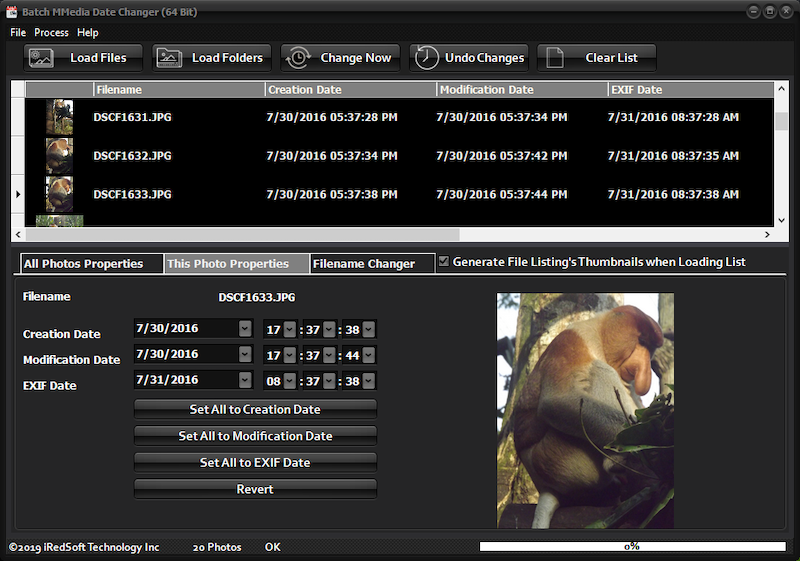
Batch JPEG Date Changer was born out of a need. It came about when I was using my digital camera, inserted the batteries and had the date set wrongly. All the photos came out with the wrong dates. There are software tools out there which allows me to change the date and time but only for the creation date and time but the big issue is that they are set to a single date and time. Not only that, the date and time encoded in the EXIF data are not modified.
Batch JPEG Date Changer is different from the rest as it gives you total control over the way your dates and times are set for Creation, Modification and EXIF Date and time. There is the option to set each file individually or using the Fixed Date Changer setting to change the Dates and/or Time. If you have the time set correctly but date wrong then just change the respective date and the original time will be preserved.
There might be instances where PM becomes AM and with the Variable Date Change Settings, you can set it to Subtract or Add hours to the dates and times. This will bring all back to what they should be.
It is also possible to sync all the dates and times to the EXIF, Creation or Modification Dates and Times.
Batch JPEG Date Changer comes in both 32 Bit and 64 Bit version and a free 21 Days trial version is available for immediate download. The trial version will time out in 21 days and comes will process up to 10 jpeg photos each time.
Batch JPEG Date Changer is priced at US$12.95 and once purchased, the trial restrictions will be lifted.
For more information, please refer to the product page at https://www.batchimage.com/product/batch-jpeg-date-changer/
We are pleased to announce the release of three new applications on the Mac App Store.
CM TIFF Viewer

CM TIFF Viewer is free TIFF viewing application which allows you to view single and multipage TIFF files. It comes with a magnification slider to enlarge the view. It is helpful in viewing TIFF files which may not be supported by the built-in Preview app. As the Mac App Store does not support trial versions of our applications, we release this application as a way for potential users test if our TIFF supported applications will work with their files.
For more information or to download this FREE application, you can do so at https://itunes.apple.com/us/app/cm-tiff-viewer/id1083844538?ls=1&mt=12
CM Batch JPEG Rotator
 CM Batch JPEG Rotator is modelled after our very own Batch JPEG Rotator which supports lossless JPEG rotation via EXIF meta data. By employing this method of rotation, the photo quality is not sacrifice and photos will be viewed in the correct orientation on any computer and platform. You will not need to worry about rotating each photo one at a time as it will evaluate every single photo and determine the appropriate orientation needed. It saves you time and hassle especially when sharing photographs with friends, family, colleagues or customers.
On the Mac and iOS devices, photos are automatically rotated so it might not be obvious that the actual underlying photos is stored as landscape oriented photos no matter if they are landscape or portrait. So what may seems right on the Apple devices would look very wrong on other platform. Solving this fundamental issue is what CM Batch JPEG Rotator is here to do.
For more information and to purchase this application, you can do so at https://itunes.apple.com/us/app/cm-batch-jpeg-rotator/id1102364838?ls=1&mt=12
CM Batch JPEG Date Changer
 CM Batch JPEG Date Changer is an application born out of necessity. It is a batch tool which helps you modify the Creation, Modification and EXIF date associated to the JPEG photo file.
It solves a fundamentally pain point which may happen when wrongly setting the digital camera date time and finding out that all the dates are messed up. CM Batch JPEG Data Changer can help by offering you three ways of rectifying this issue. First by letting you set a specific date and/or time (you can decide which to change). Secondly by applying Date Maths by adding or subtracting time and day from the date time on the photos. Thirdly by syncing all Creation, Modification and EXIF Date times.
There are tools out there which let you change file date and time but essentially what those do is to change all the files to a single date and time. It may work well for documents but that does not work well for digital photos when each photo would have been taking at different time. Moreover most tools does not deal with EXIF Date Time which would be essential for Cloud storage services such as Google Photos.
CM Batch JPEG Date Changer is made to fill that void and be a life saver when it is called upon.
For more information and to purchase this application, you can do so at https://itunes.apple.com/us/app/cm-batch-jpeg-date-changer/id1105847050?ls=1&mt=12
We are pleased to announce the immediate release of iRedSoft Image Resizer v5.20. This fixes the PNG transparency bug which causes the transparency background not to be set.
We are pleased to announce the immediate release of Batch It Pro v5.41, Batch It v6.28 and JBatch It v6.27. This fixes a bug which causes the renamed files not to be saved when Filename Changer Only option is selected and the Retain Source Folder option is unchecked.
We are pleased to announce the immediate release of JBatch It v6.26. This fixes a bug which causes the Filename Changer only option not to save the renamed files.
We encourage you to update to this version if you are facing issues with the Filename Changer option.
Downloads can be found at https://www.batchimage.com/downloads
We are pleased to announce the immediate release of Batch It v6.27 and JBatch It v6.25. This contains a fix to the PNG transparency bug.
We are pleased to announce the immediate release of Batch It Ultra v5.30 and Batch It Pro v5.40. This update fixes a PNG transparency bug.